
多线程基础
一、含义
进程
在操作系统中运行的程序就是进程。 例如QQ。播放器,游戏等线程
一个进程里面可以有多个线程。 例如视频里面的,字母,声音等
二、创建线程的方法
继承Thread类
自定义线程类继承Thread类
重写run()方法。
创建线程对象,调用start()方法启动线程。
public class ThreadDemo extends Thread{ @Override public void run() { //重写run方法 for (int i = 0; i < 20; i++) { System.out.println("我是多线程"+i); } } public static void main(String[] args) { ThreadDemo threadDemo = new ThreadDemo(); threadDemo.run(); for (int i = 0; i < 20; i++) { System.out.println("我是主方法"+i); } } }线程不一定立即执行,由cpu调度执行
实现Runnable接口
定义类实现Runnable接口
实现run方法,重写方法体
创建线程对象,调用start()方法开启线程
//实现runnable接口创建线程 public class ThreadDemo3 implements Runnable{ @Override public void run() { //重写run方法 for (int i = 0; i < 20; i++) { System.out.println("我是多线程"+i); } } public static void main(String[] args) { //创建线程对象 ThreadDemo3 threadDemo3 = new ThreadDemo3(); //创建threa线程。并开启线程 new Thread(threadDemo3).start(); for (int i = 0; i < 20; i++) { System.out.println("我是主方法"+i); } } }
实现Connable接口
实现Callable接口,接收返回值类型
重写call方法,处理抛出异常
创建目标对象
创建执行服务
提交执行
获取结果
关闭服务
三、线程停止
线程自己正常停止
设置一个标志位,让线程停止。
package org.example.testdemo.demo1; public class ThreadStop implements Runnable{ private static Boolean flag = true; @Override public void run() { int i = 0; while (flag){ System.out.println("线程正在运行"+i++); } } public static void main(String[] args) { ThreadStop threadStop = new ThreadStop(); new Thread(threadStop).start(); for (int i = 0; i < 1000; i++) { System.out.println("主方法"+i); if (i == 900){ flag = false; System.out.println("线程停止"); } } } }
四、sleep线程休眠
使用线程休眠进行倒计时
使用线程休眠进行获取系统当前时间
//sleep练习模拟倒计时
public class sleepTest {
// public static void main(String[] args) {
// try {
// turnDown();
// } catch (InterruptedException e) {
// throw new RuntimeException(e);
// }
// }
public static void turnDown() throws InterruptedException {
int num = 10;
while (true){
Thread.sleep(1000);
System.out.println(num--);;
if (num<0){
break;
}
}
}
//获取系统当前时间
public static void main(String[] args) throws InterruptedException {
Date date = new Date(System.currentTimeMillis());
while (true){
System.out.println(new SimpleDateFormat("HH:mm:ss").format(date));
Thread.sleep(1000);
date = new Date(System.currentTimeMillis());
}
}
}
五、Join线程强制执行/插队
join方法是合并线程,此线程之行完后再执行其他线程
public class JoinTest implements Runnable{
@Override
public void run() {
System.out.println("线程开始插队");
for (int i = 0; i < 100; i++) {
System.out.println("线程插队"+i);
}
System.out.println("线程结束插队");
}
public static void main(String[] args) throws InterruptedException {
JoinTest joinTest = new JoinTest();
Thread thread = new Thread(joinTest);
thread.start();
for (int i = 0; i < 600; i++) {
System.out.println("主线程正在执行+"+i);
if (i==200){
thread.join();
}
}
}
}
六、state线程状态
线程有五种状态
new 新生 ,runnable 执行, blocked 阻塞, waiting 等待, timed_waiting 等待另外一个线程。terminated 退出
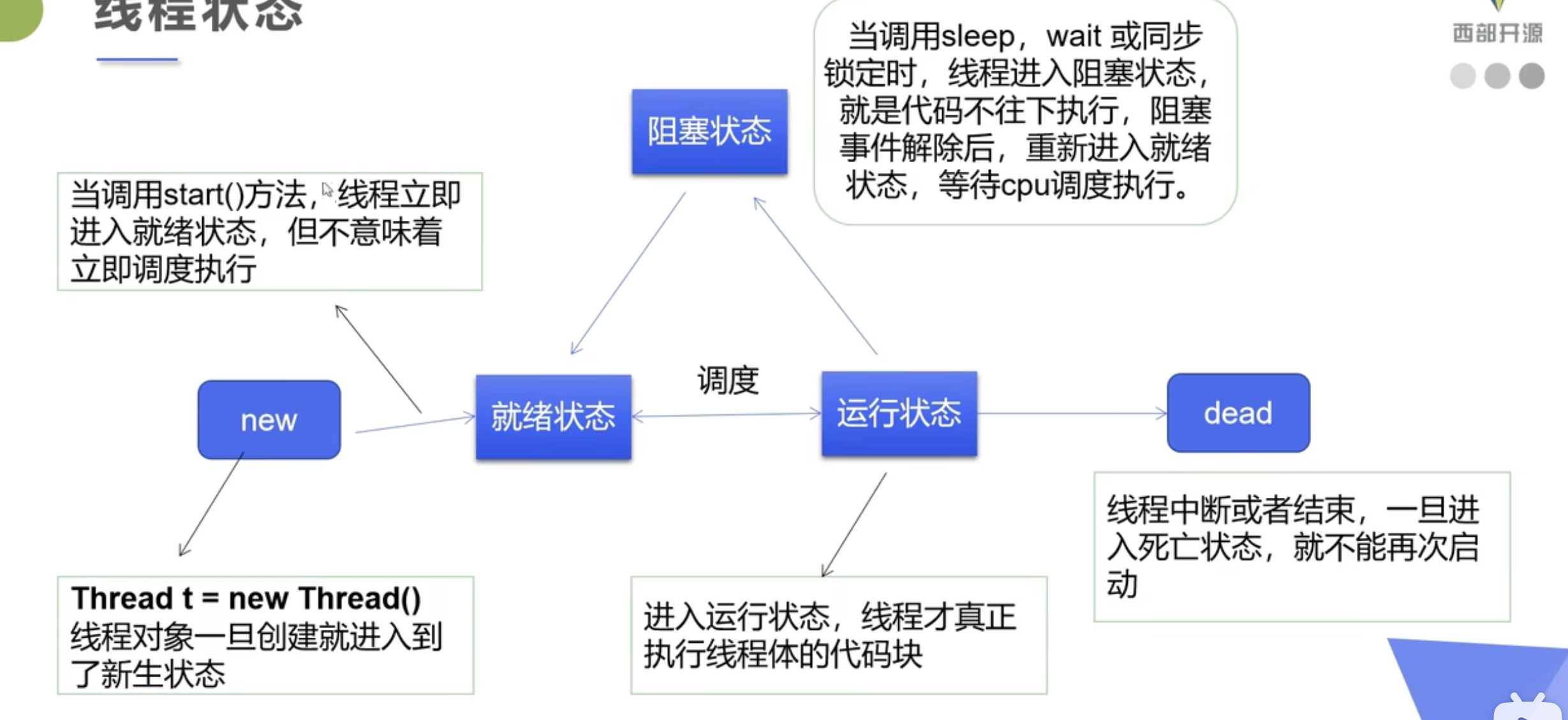
//线程状态
public class StateTest {
public static void main(String[] args) throws InterruptedException {
Thread thread = new Thread(() -> {
for (int i = 0; i < 5; i++) {
try {
Thread.sleep(1000);
} catch (InterruptedException e) {
throw new RuntimeException(e);
}
}
System.out.println("////////");
});
Thread.State state = thread.getState();
System.out.println(state);
thread.start();
state = thread.getState();
System.out.println(state);
while (state != Thread.State.TERMINATED){
Thread.sleep(100);
System.out.println(state);
state = thread.getState();
}
System.out.println(state);
}
}
七、守护线程
线程分为用户线程(main)和守护线程(后台记录日志,监控内存,垃圾回收)
虚拟机必须确保用户线程执行完毕
虚拟机不用等守护线程执行完毕
public class DaemonTest {
public static void main(String[] args) {
Shou shou = new Shou();
Thread thread = new Thread(shou);
//设置守护线程
thread.setDaemon(true);
thread.start();
Yong yong = new Yong();
new Thread(yong).start();
}
}
class Shou implements Runnable{
@Override
public void run() {
while (true){
System.out.println("这是守护线程");
}
}
}
class Yong implements Runnable{
@Override
public void run() {
for (int i = 0; i < 100; i++) {
System.out.println("这是用户线程");
}
System.out.println("用户线程结束");
}
}八、synchronized同步块
synchronized(obj){}
obj为同步监视器,可以是任何对象。
同步方法中无需制定同步监视器,就是这个对象的本身
public static void main(String[] args) throws InterruptedException {
List<String> list = new ArrayList<>();
for (int i = 0; i < 10000; i++) {
new Thread(() -> {
synchronized (list){
list.add(Thread.currentThread().getName());
}
}).start();
}
// Thread.sleep(3000);
System.out.println(list.size());
}九、死锁
多个线程各自占有一些共享资源,并且相互等待其他线程占有资源才能运行。而导致两个或多个线程都在等待对方释放资源,都停止执行的情况。
某一个同步块同时拥有两个以上对象的锁。
产生死锁的必要条件(破坏其中一个就可避免死锁)
互斥条件:一个资源每次只能被一个进程使用
请求与保持条件:一个进程因请求资源而阻塞时,对已获得的资源保持不放
不剥夺条件:进程已获得资源,在未使用完之前,不嫩强行剥夺
循环等待条件:若干进程之间形成一种头尾相接的循环等待资源关系
//死锁模拟练习
public class DelLockTest {
    public static void main(String[] args) {
        Eat eat = new Eat(0,"小明");
        Eat eat1 = new Eat(1,"小红");
        eat.start();
        eat1.start();
    }
}

class Apple{}

class Banner{}

class Eat extends Thread{
    static Apple apple = new Apple();
    static Banner banner = new Banner();

    int choose;
    String name;

    Eat(int choose,String name){
        this.choose = choose;
        this.name = name;
    }

    @Override
    public void run() {
        try {
            eatFruit();
        } catch (InterruptedException e) {
            throw new RuntimeException(e);
        }

    }

    private void eatFruit() throws InterruptedException {
        if (choose == 0){
            synchronized (apple){
                System.out.println(this.name+"我想吃苹果");
                Thread.sleep(1000);
//                synchronized (banner){
//                    System.out.println(this.name+"我想吃香蕉");
//                }
            }
            synchronized (banner){
                System.out.println(this.name+"我想吃香蕉");
            }
        }else {
            synchronized (banner){
                System.out.println(this.name+"我想吃香蕉");
                Thread.sleep(3000);
//                synchronized (apple){
//                    System.out.println(this.name+"我想吃苹果");
//                }
            }
            synchronized (apple){
                System.out.println(this.name+"我想吃苹果");
            }
        }
    }
}
十、Lock锁
显式定义同步锁对象来同步,一般使用ReentrantLock对象
lock与synchronized
lock是显式锁(需手动开锁和解锁)synchronized是隐式锁,出了作用域自动释放
lock只有代码锁,synchronized有代码锁和方法锁
lock性能和扩展性比synchronized好
public class LockTest {

    public static void main(String[] args) {
        LockTest2 lockTest2 = new LockTest2();

        new Thread(lockTest2).start();
        new Thread(lockTest2).start();
        new Thread(lockTest2).start();
    }
}


class LockTest2 implements Runnable{
    int ticketNum = 10;

    private final ReentrantLock lock = new ReentrantLock();
    @Override
    public void run() {
        while (true){
            try {
                //加锁
                lock.lock();
                if (ticketNum>0){
                    try {
                        Thread.sleep(100);
                    } catch (InterruptedException e) {
                        throw new RuntimeException(e);
                    }
                    System.out.println(ticketNum--);
                }else {
//                System.out.println("没有了");
                    break;
                }
            }finally {
                //解锁
                lock.unlock();
            }

        }
    }
}
十一、线程通信方法
管程法
package com.example.demo.thread;

//测试线程通信,管程法
public class PcTest {
    public static void main(String[] args) {
        SynContainer synContainer = new SynContainer();
        Product product = new Product(synContainer);
        Costumer costumer = new Costumer(synContainer);

        product.start();
        costumer.start();
    }
}

class Product extends Thread{
    SynContainer synContainer;

    public Product(SynContainer synContainer){
        this.synContainer = synContainer;
    }

    @Override
    public void run() {
        for (int i = 0; i < 100; i++) {
            synContainer.push(new Chicken(i));
            System.out.println("生产了"+i+"只鸡");
        }
    }
}

class Costumer extends Thread{
    SynContainer synContainer;
    public Costumer(SynContainer synContainer){
        this.synContainer = synContainer;
    }
    @Override
    public void run() {
        //消费者消费
        for (int i = 0; i < 100; i++) {
            System.out.println("消费了第"+synContainer.pop().id+"只鸡");
        }

    }
}

class Chicken {
    int id;

    public Chicken(int id){
        this.id = id;
    }
}

class SynContainer{
    Chicken[] chickens = new Chicken[10];

    int count = 0;

    //生产
    public synchronized void push(Chicken chicken){
        if(count == chickens.length){
            try {
                this.wait();
            } catch (InterruptedException e) {
                throw new RuntimeException(e);
            }
        }
        chickens[count] = chicken;
        count++;
        //唤醒其他线程
        this.notifyAll();
    }

    //消费
    public synchronized Chicken pop(){
        if (count==0){
            try {
                this.wait();
            } catch (InterruptedException e) {
                throw new RuntimeException(e);
            }
        }
        count--;
        Chicken chicken = chickens[count];
        this.notifyAll();
        return chicken;
    }
}
信号灯法,标志位解决
package com.example.demo.thread;

//测试线程通信,标志位
public class PcTest1 {
    public static void main(String[] args) {
        Tv tv= new Tv();
        new Play(tv).start();
        new Watch(tv).start();
    }
}

class Play extends Thread{
    Tv tv;
    Play(Tv tv){
        this.tv = tv;
    }

    @Override
    public void run() {
        for (int i = 0; i < 20; i++) {
            this.tv.play("嘻嘻哈哈");
        }
    }
}

class Watch extends Thread{
    Tv tv;
    Watch(Tv tv){
        this.tv = tv;
    }
    @Override
    public void run() {
        for (int i = 0; i < 20; i++) {
            this.tv.watch();
        }

    }
}

class Tv {
    String voice;
    boolean flag =true;

    //表演
    public synchronized void play(String voice){
        if (!flag){
            try {
                this.wait();
            } catch (InterruptedException e) {
                throw new RuntimeException(e);
            }
        }
        System.out.println("演员表演了"+voice);
        this.notifyAll();
        this.voice = voice;
        this.flag = !this.flag;
    }
    //观看
    public synchronized void watch(){
        if (flag){
            try {
                this.wait();
            } catch (InterruptedException e) {
                throw new RuntimeException(e);
            }
        }
        System.out.println("观众观看了"+voice);
        this.notifyAll();;
        this.flag = !this.flag;
    }
}
十二、线程池
ExecutorService线程池接口,常见子类:ThreadPoolExecutor
execute方法: 执行任务,无返回值,一般执行Runnable
submit方法:执行任务,有返回值,一般执行Callable
shutdown方法:关闭连接池
Executors:工具类
package com.example.demo.thread;

import java.util.concurrent.ExecutorService;
import java.util.concurrent.Executors;

//线程池测试类
public class PoolTest {
    public static void main(String[] args) {
        //1. 创建线程池
        ExecutorService executorService = Executors.newFixedThreadPool(10);
        //2. 执行线程
        executorService.execute(new MyThread());
        executorService.execute(new MyThread());
        executorService.execute(new MyThread());
        executorService.execute(new MyThread());
        //3. 关闭线程
        executorService.shutdown();
    }
}

class MyThread implements Runnable{

    @Override
    public void run() {
        System.out.println(Thread.currentThread().getName());
    }
}